FOR TEACHERS, EAS, SAT TEAMS, COUNSELORS & ADMINS
Daily Behavior Report Card
Track specific behavior skills across the school day—not just a good day or a bad day. Cub Guide gives K–8 educators a digital daily behavior report card with subject-by-subject ratings, comments, and progress trends for families and Student Assistance Teams.
Included for individual teachers · No credit card required
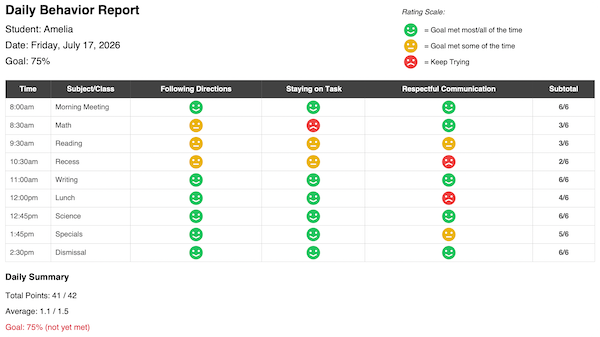
What is a daily behavior report card (DBRC)?
A daily behavior report card is a short record of a student's progress on specific behavior skills at agreed points during the school day. Educators define what success looks like, rate the same skills consistently, and share the results with the student, family, and support team. Schools can use a DBRC within Check-In/Check-Out (CICO) or another targeted Tier 2 support; the card records progress, while the team determines the intervention and reinforcement plan.
“Using Cub Guide has completely transformed how we track student behavior. It is saving me HOURS on quarterly data entry, the trends are amazing, and parents were so appreciative of the weekly email summaries. That is something I couldn't do before.”
Jami, Special Education Teacher, Ridgway Middle School
Why teachers choose Cub Guide
Built by people who've sat in the classroom. Every feature is here because a real teacher asked for it.
No more lost paper cards
Every DBRC lives in Cub Guide. Nothing goes home in a backpack and disappears.
Automatic parent summaries
With parent email summaries enabled, families receive a weekly recap of recorded progress instead of relying on a paper card making it home.
Every card is data
Every DBRC entry becomes a data point on the student's trend chart, no re-entry, no spreadsheet.
Daily ratings
Rate behavior skills by subject on a 3-point scale
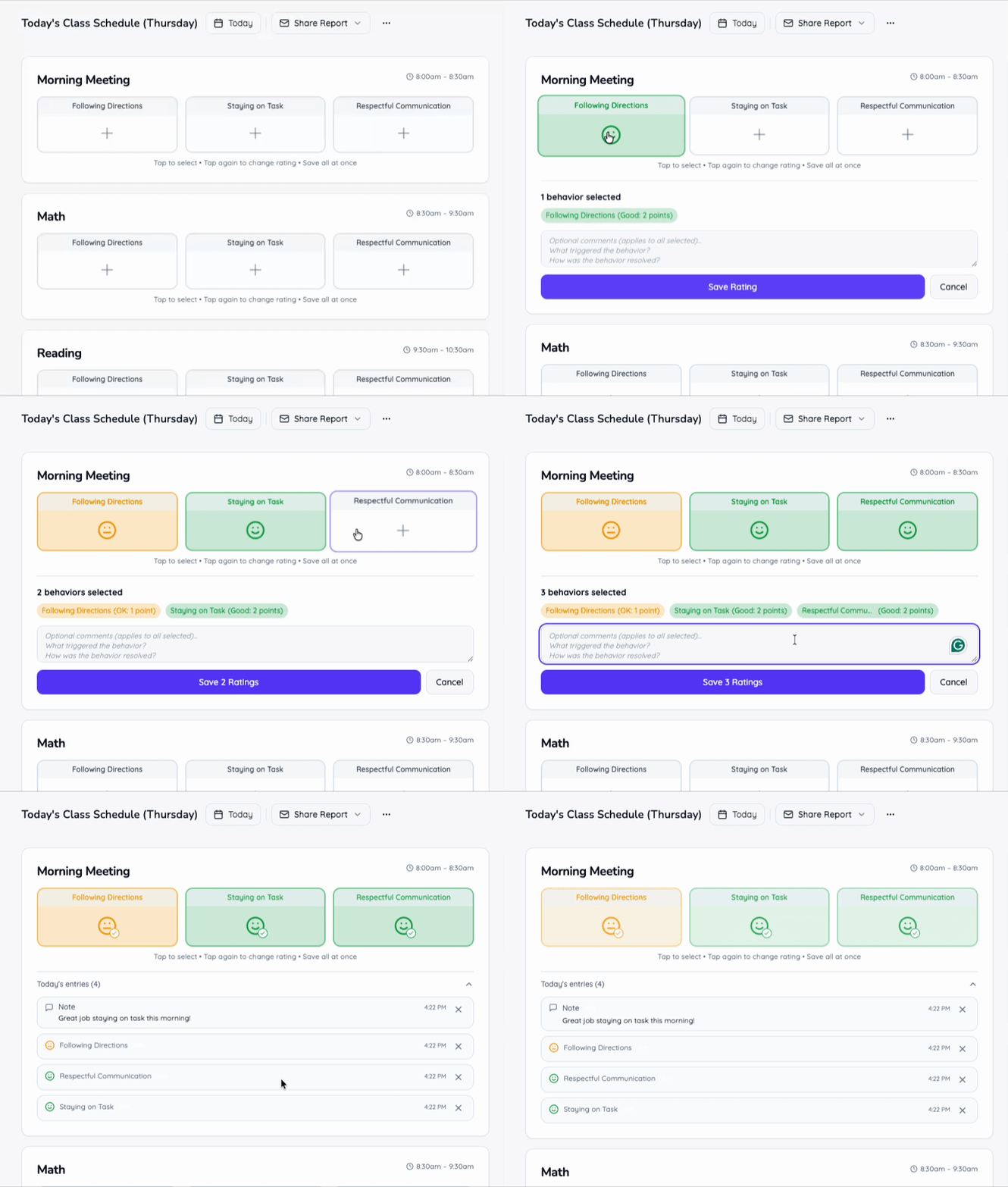
Record Great (2), OK (1), or Keep Trying (0) for each target skill. Add a comment to explain the context behind a rating, and mark absences so missed subjects are not mistaken for low performance.
Trends
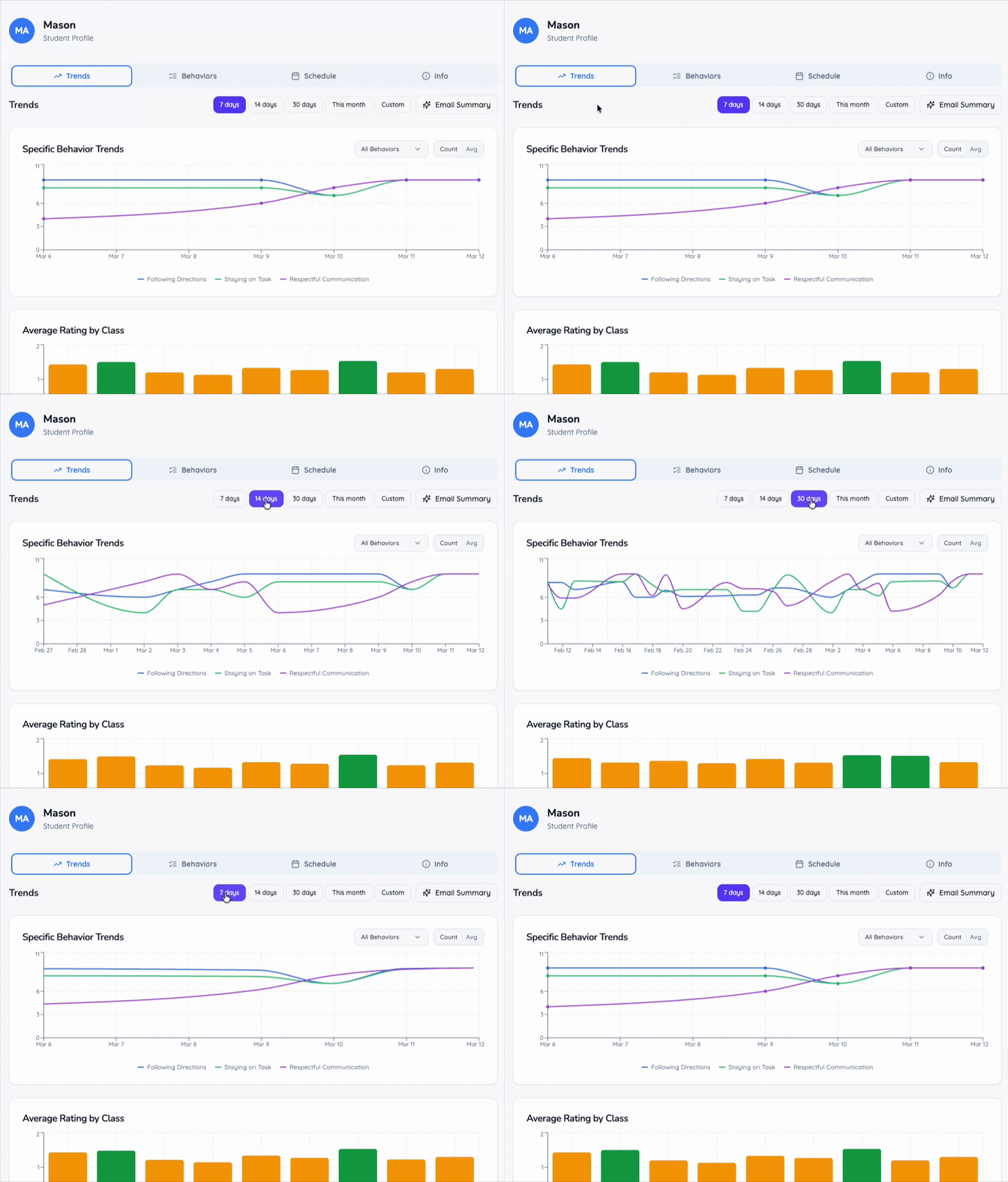
Review behavior patterns by class, weekday, and week
Behavior Trends turns recorded ratings into summaries and charts. Select a class or weekday to read its comments within your date range, then review week-by-week progress before deciding whether to keep or adjust a support.
Daily behavior report card example: two skills, three subjects
Fictional classroom example—not a student record or a promised outcome. An educator tracks two observable skills for Alex: starts the assigned task within two minutes and raises a hand before speaking during whole-group instruction. The team agrees on the rating criteria before collecting data. In Cub Guide, Great = 2, OK = 1, and Keep Trying = 0.
| Subject | Starts the assigned task | Raises a hand | Educator comment |
|---|---|---|---|
| Reading | Great · 2 | Great · 2 | Started independently and waited to be called on. |
| Math | Keep Trying · 0 | OK · 1 | Needed help with the first problem; began after a worked example. |
| Science | Great · 2 | OK · 1 | Started on time; needed one reminder to raise a hand. |
This example earns 8 of 12 possible points: 4 of 6 for starting the task and 4 of 6 for raising a hand. The math comment gives the team a question to investigate—not a diagnosis: does a worked example help Alex get started?
1. Set up skills and subjects
Add the student's target behavior skills and scheduled subjects. Set a goal for each skill and agree on what each rating means across educators.
2. Record ratings with context
Rate each skill during the subject and add a short comment when context matters. Mark a subject absent when the student misses it rather than entering a Keep Trying rating.
3. Look beyond the daily total
Open Behavior Trends and choose a date range. Select Math in Average Rating by Class / Time of Day to review the comments for that subject. Select Monday in Average Rating by Day of Week to review comments from every Monday in the selected range. Comments help the team explore possible reasons for a pattern; they do not establish its cause.
4. Review, share, and adjust
Review week-by-week progress, share a PDF report with the family or team, and record the next step in SAT Meetings above the Trends tabs. Behavior and Academic Trends are separate, so the team can review academic scores alongside behavior evidence without treating them as the same measure.
Frequently asked questions
The stuff teachers and admins actually ask before they sign up.
Related behavior support resources
Connect daily ratings to a consistent check-in and check-out routine.
Explore how targeted supports fit into your MTSS workflow.
Bring ratings, comments, and next steps into the team's review.

Ready to spend less time on paperwork?
Set up your first students in about 10 minutes. Included for individual teachers.